Streamline Operations / Self-Order Kiosk

Empower customers. Lift average ticket.

OrderUp turns any iPad into a self-order kiosk with vibrant visual menus and seven AI recommendation algorithms that effectively upsell every order.

iPad
no proprietary hardware
7
AI recommendation algorithms
SalesVu + Square
POS integrations
Multi-kiosk
per location
Increase sales, decrease costs

When customers control the menu, they buy more.

Stunning visual displays

Customers want what they can see in vibrant detail. Entice patrons with high-quality images of every product so the kiosk does the visual selling for you.

AI-powered recommendations

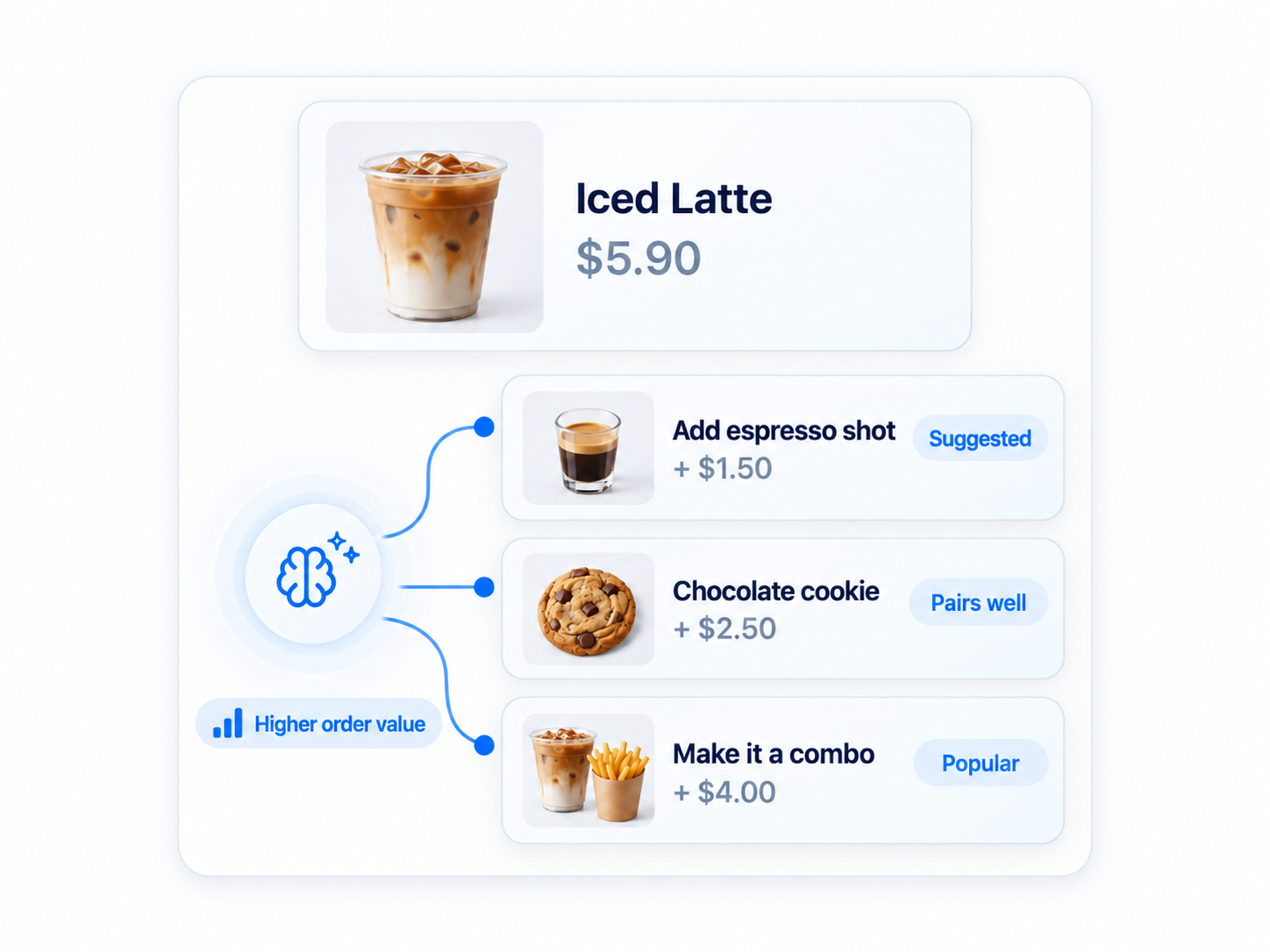
Seven recommendation algorithms predict what each customer is most likely to add. Don't guess — use data to surface the right upsell at the right moment.

Customers prefer self-service

When patrons are in control, they take their time, browse modifiers, and order more. Average tickets rise without adding labor.

Don't lose customers to long lines

Take more orders during peak hours. A second or third kiosk doubles or triples your effective register count without another hire.

Save on labor costs

Re-allocate counter staff to expediting, hospitality, or growth work — kiosks handle the routine order entry.

Auto-syncs your existing menu

Bring your menu and product photos in from your existing POS account. The OrderUp kiosk integrates with SalesVu and with Square POS.

How it works

Live in days, not months.

01

Set up an iPad as a kiosk

OrderUp runs on iPad — no proprietary hardware. Mount it at the entrance, the counter, or in line.

02

Sync your menu and photos

The kiosk pulls in the menu, modifiers, taxes, and product photos from your existing SalesVu or Square POS account.

03

Customer browses and orders

Patrons tap through categories, customize items, accept AI-recommended add-ons, and pay by card or mobile wallet.

04

Order routes to the kitchen

Tickets land on the SalesVu Order Manager and your kitchen display alongside POS, online, and QR orders.

Powered by the Recommendations engine

Capabilities your team will actually use.

  • Vibrant photo-driven menu
  • Seven AI recommendation algorithms
  • Modifier and combo support
  • Multi-language menus per location
  • Card and mobile wallet payment
  • Auto menu sync from SalesVu or Square POS
  • Tickets route to the SalesVu kitchen display
  • Pickup numbers and SMS-ready notifications
Recommended add-ons
Add an espresso shot
+ $1.50 · suggested
Make it a combo with fries
+ $4.00 · popular
Add a chocolate chip cookie
+ $2.50 · pairs well

Built for high-volume counters

Coffee shops
Pizza shops
QSR
Ice cream shops
Concessions
Cafeterias

Frequently Asked Questions

What hardware does OrderUp run on?

OrderUp is an iPad app, so you can use any compatible iPad and a mount of your choice. No special vendor-locked hardware required.

Does it integrate with my existing POS?

Yes. OrderUp integrates with SalesVu POS and with Square POS, including automatic transfer of your menu and product photos so onboarding is fast.

What kind of recommendations does the AI make?

Seven recommendation algorithms power the upsell engine — based on what's typically bought together, what's trending, what the customer has bought before, and other signals — so the kiosk suggests items the customer is genuinely likely to add.

Can I run multiple kiosks in one location?

Yes. Run as many kiosks as you need. They share the same menu and route into the same Order Manager.

Does the kiosk accept Apple Pay?

Yes. Card and mobile wallet payments are supported through your SalesVu payment processor.

Will it cause confusion at the counter?

No. Tickets from the kiosk arrive in the same kitchen display as counter orders, with a kiosk tag so the team knows the source. Pickup numbers are issued automatically.

What do the AI Recommendation widgets do inside the kiosk?

Frequently Bought Together, You Might Also Like, Best Sellers and Trending Now render in the kiosk flow exactly as they do on your website. Average ticket per session tends to rise without staff intervention.

What does Loyalty Program on OrderUp do?

Members enroll, identify themselves and redeem points right at the kiosk. The most engaged customers don't have to wait for a cashier to look them up.

What does Coupon Codes on the Kiosk do?

Customers enter promo codes from a campaign at the kiosk. Marketing offers actually convert at the kiosk instead of being forgotten at checkout.

What does Refund/Exchange on the Kiosk app do?

Configure the kiosk to handle simple returns or exchanges, freeing staff for higher-value interactions. Speed of resolution and customer satisfaction both rise.

What does Change Font Size on the Kiosk do?

Larger touch targets help older customers and accessibility cases tap accurately. Drop-off and order-correction calls fall.

Cut the line. Lift the ticket.

Talk to a SalesVu specialist about adding self-order kiosks that pay for themselves in saved labor and added attach.

We use cookies to personalize content and analyze our website traffic. Additionally, we share information about your site usage with our analytics partners to improve performance and user experience. Additional details are available in our Cookie Policy.
Accept All Cookies Choose Cookies