Core Module

The beating heart of your
in-store operations.

A flexible Point of Sale built for speed, reliability, and complex workflows. Whether you run a bustling cafe or a multi-location retail brand, SalesVu scales to fit.

See POS in Action

Checkout built for your reality.

Counter & Mobile POS

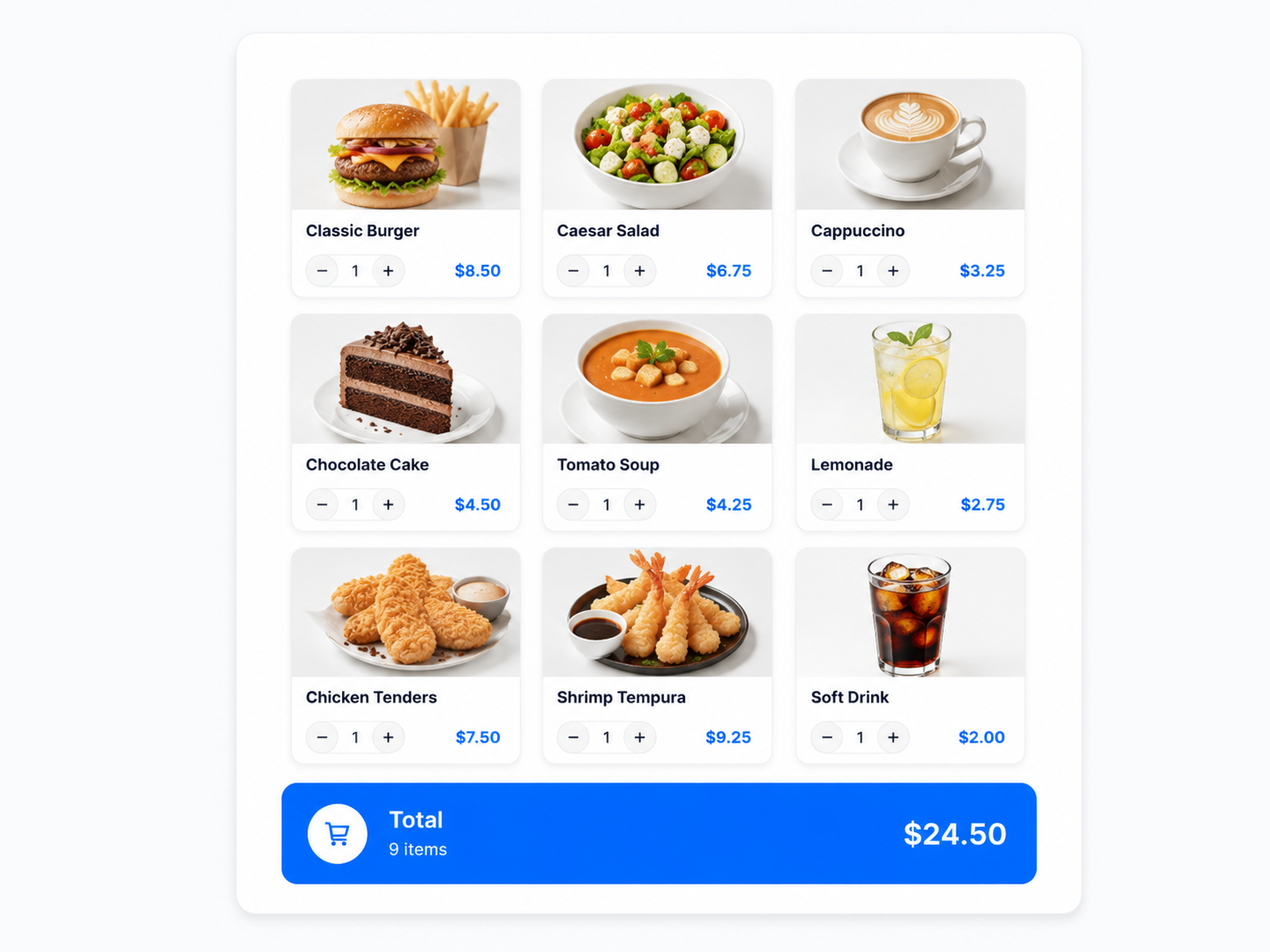
Ring up customers at the counter or bust lines with mobile POS tablets on the floor. Works seamlessly across iPads and iPhones.

F&B specific workflows

Kitchen routing to multiple prep stations, complex modifier groups, split checks, and visual table & tab management.

Frictionless returns & exchanges

Handle complex returns, exchanges across locations, and store credit issuances without holding up the line.

Item
Item
Item
Item
Item
Item
Item
Item
Item
Total$24.50
An On-Premise AI Workforce

The first POS with a full workforce of on-premise AI analysts.

Square, Toast and Clover give you a register and a report. SalesVu gives you seven specialist AI agents that read your POS in real time and tell you exactly what to do next — about your staff, your wait times, your shelves, your tables and your kitchen. Operational intelligence no legacy POS can match.

Theft Detection Analyst

Monitors POS transactions, voids, comps and discounts in real time, flagging anomalous patterns that indicate shrinkage or training gaps — before a quarter's margin walks out the door.

Meet the Agent

Customer Service Agent

Intercepts calls when your staff is on the floor, answering questions about hours, menus and item availability with live POS data — so no caller hits voicemail during a rush.

Meet the Agent

Staff Schedule Analyst

Reads every clock-in, clock-out, ticket and tip against weather, foot traffic and sales velocity — then rewrites next week's schedule for the exact balance of sales, labor cost and service that legacy POS vendors can only guess at.

Meet the Agent

In-Store Wait Time Analyst

Continuously measures queue length and time-to-ticket across every counter, kiosk and handheld. Pinpoints the windows when you need to open another station — or close one and redeploy the labor — so no customer ever abandons a line on your watch.

Meet the Agent

Product Arrangement Planogram Analyst

Correlates basket composition, dwell time and category margin to recommend exactly which products belong on which shelf, aisle and endcap — a profit-maximizing planogram refreshed weekly. No legacy POS produces this; most retailers pay a consultant for one a year.

Meet the Agent

Table Layout Analyst

Watches party size, turn time, seat-by-seat spend and reservation pacing to recommend the dining-room layout that maximizes revenue per square foot — the kind of operational redesign your concept usually only gets when you remodel.

Meet the Agent

Kitchen Efficiency Analyst

Reads every fire, every prep time, every re-fire and every comp coming off the KDS — flags the exact stations, shifts and dishes where the kitchen isn't running at capacity, and prescribes a specific course of action. The line-cook coach no POS competitor offers.

Meet the Agent
Four POS solutions, one platform

Pick the POS for the way you serve.

Every SalesVu POS rings into the same data warehouse — so whichever surface you choose, your AI workforce sees every order, every modifier, every refund, every membership renewal in real time.

Counter POS

Counter POS for retail & restaurants

The full-power iPad POS at the register. Fast item lookup, complex modifiers, split checks, online orders, reservations and walk-ins — all on one ticket, offline-resilient, with AI agents watching the back office.

  • 16 native checkout flows from item entry to refunds
  • Online orders, reservations & walk-ins ring through the same POS
  • Offline mode keeps cash sales running when WiFi drops
Explore Counter POS
Handheld POS

Handheld POS for tableside & line-busting

The same SalesVu POS on an iPhone or smaller tablet — for table service, fitting rooms, food trucks, festivals, and curbside. Take payment where the customer stands; no line, no second terminal.

  • Tableside ordering, payment & pre-authorization
  • Tap-to-pay, swipe & EMV without going back to the counter
  • Same menu, prices, modifiers & loyalty as the counter
Explore Handheld POS
Salon & Spa POS

Salon & Spa POS with provider-aware booking

Welcome by SalesVu schedules clients, tracks commissions per provider, and rings up retail on the same ticket as the service. Walk-in waitlists run beside the appointment calendar — chairs and rooms stay full.

  • Provider-aware calendar, branded online booking, walk-in waitlist
  • Commissions, retail attribution & consolidated billing in one ticket
  • Deposits, no-show charges & one-tap check-in
Explore Salon & Spa POS
Class & Fitness POS

Class & Fitness POS for studios & memberships

Here by SalesVu unifies drop-ins, multi-class packs and recurring memberships with branded online booking, one-tap check-in, and retail at the front desk. Recurring billing retries failed cards automatically.

  • Drop-ins, class packs & monthly memberships in one app
  • Recurring auto-billing with retry, hold & member self-service
  • Instructor schedules, capacity & waitlists with online booking
Explore Class & Fitness POS
Built for operations. Engineered for AI.

Every feature is a data point your AI agents can act on.

These aren't checkbox features — they're the operational primitives that keep the line moving and the labeled, structured signal that lets your AI workforce upsell at checkout, catch shrinkage in real time, and grow regulars while you serve the next guest.

Speed & checkout

Built so any staff member can ring up a complex order in seconds — and every keystroke becomes a data point.

Fast item entry & favorites grid

Tap-to-add buttons, search and barcode scan get a ticket from empty to total in seconds. Trains the AI on real velocity per item, hour and staff.

Modifiers, variants & bundles

Complex builds (size, milk, temperature, prep style) without slowing the line. Every modifier becomes a signal for the Upselling and Personalization agents.

Bar code scanning

Scan SKUs at the counter or kiosk. Real-time inventory deduction and zero wrong-button errors.

Offline mode

Keep ringing up cash and queueing card auths when WiFi drops. Sales never go dark; data syncs the moment the network is back.

Money, tabs & payments

Capture every dollar cleanly and close every loophole. The AI agents read the exceptions and flag them in real time.

Accept every payment

Cash, card, EMV, contactless, Apple Pay, gift cards, store credit — and bring-your-own processor. Failed cards on memberships retry automatically.

Pre-authorize cards to open tabs

Card-on-file holds a tab open without dragging the guest to the counter. Pre-auth → tip adjust → capture without re-running the card.

Split checks any way

By guest, by seat, by item, evenly. The POS keeps the math and the seat-by-seat history — no comp'd items by mistake.

Tips & service charges

Configurable tip lines, service charges, large-party gratuity and tip pooling — captured cleanly for payroll.

Refunds, exchanges & receiptless returns

Process a return by looking up the original order on the POS — no paper receipt required, fully auditable, no manager override needed.

Shift management

Cash drops, declared tips, blind cash counts and close-out reports per shift. Variance reports feed the Theft Detection agent.

Service & workflow

Service-specific workflows for F&B, retail and appointments — all on the same POS, all feeding one data warehouse.

Kitchen integration & KDS

Fire by category to the right prep station, re-fire individual items, color-code orders by status. Pacing data trains the AI on real ticket times.

Seat numbers & per-seat items

Assign items to seats; the POS knows whose burger is whose at split time.

Appointments, reservations & walk-ins

Schedules, reservations and a walk-in waitlist all flow into the same POS — one calendar, one ticket.

Online ordering, QR & kiosk

Online orders, table QR ordering and self-order kiosks all ring through the same menu, prices and modifiers.

Dynamic catalogs (time-based menu)

Breakfast → lunch → happy hour → dinner switches automatically. No 9 pm breakfast orders.

Customers, loyalty & engagement

Every transaction lights up a customer profile — the raw fuel for personalized promotions, reviews and lifetime-value growth.

Customer lookup & CRM

Add or look up a customer at checkout; every visit, package and purchase ties to one profile and one lifetime value.

Scan US driver's license

Scan to create a profile, verify age for restricted products, and populate name/address — no manual entry.

Tiered loyalty program

Three-level loyalty recognizes regulars on every visit. The Personal Rewards agent reads behavior and proposes the right reward.

Discounts, promos & coupons

Item, ticket, percentage, dollar, first-class-free, refer-a-friend. Rules and expirations stop promos from going rogue.

Physical & digital gift cards

Activate, reload and redeem on the POS; balances shared across locations and channels — a high-margin revenue stream.

Configurable receipts

Email, SMS or print — branded, with logo, custom fields and gift-receipt formats. Captured email lands in the CRM for marketing.

Security, compliance & multi-location

Roles, audit trails and 2FA stop the most common loopholes — and the audit trail feeds the AI's risk detection in real time.

Role-based permissions

Servers see only their own tabs; managers see all. Stops tip theft and back-of-house disputes.

Enforce 2FA for all employees

Blocks the most common account-takeover path into your back office where pricing and payroll live.

PIN-authorized voids & comps

Manager PIN required for voids, comps and discounts — with email summaries to the owner for every override.

Tax-exempt customer marking

Flag nonprofits, resellers and government accounts as tax-exempt; POS skips tax automatically and keeps filings clean.

Multi-location management

Per-location menus, pricing, taxes and staff — rolled up into one corporate view for owners and regional leads.

Cash & hosted event modes

Run a pop-up or festival on its own menu and ledger without polluting your regular reports.

One ticket. Twelve agents. Compounding insight.

Every modifier, comp, void, tip, refund, check-in, package burn-down and recurring renewal is captured with structure and timing. That stream is the substrate the SalesVu AI Workforce reads continuously — the Theft Detection Analyst on voids and discounts, the Upselling agent on real basket composition, the Personal Rewards agent on real frequency, the Reviews Booster on real post-visit timing, the Customer Service agent on real menu and availability. Better POS data isn't a nice-to-have; it's what makes the agents work.

Meet the AI workforce

Frequently Asked Questions

Does the POS work without an internet connection?

Yes, SalesVu supports an offline mode that allows you to continue ringing up cash sales and queueing credit card authorizations when the internet goes down.

Can I manage multiple locations from one dashboard?

Absolutely. SalesVu is built for multi-location businesses, allowing you to manage pricing, menus, and reporting for all stores from a single corporate login.

Does it integrate with my existing hardware?

SalesVu is hardware agnostic. We work with iPads, iPhones, and integrate natively with Square terminals and other standard receipt printers and cash drawers.

Is this module included with SalesVu, or do I need a separate plan?

It is part of the SalesVu platform. Your account team can confirm what is bundled in your specific plan and whether any optional modules apply to your setup.

Does it require new hardware?

Generally no — it runs on the same iPads, terminals, kiosks, scanners and printers most SalesVu accounts already use. Your account team can confirm peripheral compatibility for your setup.

How long does it take to get started?

Most operators are live during their onboarding plan. Multi-location and multi-concept rollouts run on a per-site schedule with your account team.

Does it work across multiple locations?

Yes. SalesVu is built multi-location, with per-location configuration and a rolled-up corporate view for owners and regional leads.

Where does this module get its data?

From the SalesVu data layer — POS, eCommerce, Inventory, CRM and loyalty — so every module reads from the same operational source of truth.

Will anything send or change without my approval?

By default, drafts and recommendations require a human approval step. You can later opt in to auto-actions for specific recurring workflows once you trust the outputs.

Does this work for restaurants and retail or just one?

Both. SalesVu is one platform across retail, restaurants, salons, studios, venues and grocery, so the same module fits whether the SKU is a t-shirt, an entrée, a service or a class.

Can I run POS, eCommerce, inventory and CRM from one SalesVu account?

Yes. That is the point of the platform. Counter sales, online orders, vendor POs, loyalty and customer records all share one data layer.

Does the POS support kiosks, QR ordering and KDS?

Yes. SalesVu includes a Self-Order Kiosk, QR Code Ordering for tables, and an Order Manager / KDS for kitchen fulfillment as part of the platform.

Is processing locked to one provider?

No. SalesVu is processor-agnostic — you can use SalesVu's processing or bring your own merchant account.

What does it cost?

Software is priced monthly per location, with processing pricing on top depending on whether you use SalesVu's processor. The AI Workforce is included.

What does Receiptless Returns do?

It lets staff process a return without the customer's printed receipt by looking up the original order on the POS. That matters because it removes one of the biggest friction points at the counter and keeps the refund auditable instead of forcing a manager override or store credit.

What does the Order Lock (cross-device sync) feature do?

When one server opens an order on their iPad, the same order locks on every other terminal until it's saved or closed. For a busy restaurant or salon that means two employees can't accidentally double-charge the same tab or write over each other's edits during a rush.

What does Fire Items to Kitchen by Category do?

It lets you send appetizers to the cold station and entrées to the grill — from one ticket — automatically. Owners avoid food going out together that shouldn't, and back-of-house pacing finally matches front-of-house service.

What does Fire Individual Items to the Kitchen do?

Servers can re-fire one item (a forgotten side, a refire on the steak) without re-sending the whole ticket. That saves comp'd food and keeps the kitchen calm when something slips.

What does Pre-Capture and Save Tip Adjustments do?

It pre-authorizes the card amount and lets the server adjust the tip after the guest signs, without re-running the card. Owners stop losing tips to expired auths and skip the manual end-of-night tip-edit chore.

What does the Seat Numbers feature do?

Add seat positions to a table and assign each item to a specific seat. When it's time to drop checks or split the bill, the POS knows whose burger is whose — no mental math, no comped items by mistake.

What does Order Status with Email/SMS Notifications do?

You configure statuses like Preparing, Ready, Out for Delivery, and customers get the corresponding text or email automatically. That cuts phone calls asking 'is my order ready?' and improves perceived service without adding labor.

What does Tax-Exempt Customer marking do?

Flag a customer (a nonprofit, a reseller, a government account) as tax-exempt and the POS skips tax automatically on their orders. Avoids cashier error, keeps your sales-tax filing clean, and removes a manual override path that's prone to abuse.

What does Scan US Driver's License do?

Scan the back of a US license to instantly create the customer profile, verify age for restricted products, and populate name/address fields. That eliminates manual data entry at the counter and locks in age-gating compliance for alcohol, cannabis and tobacco.

What does the Customer Display do?

A front-facing iPad mirrors the order back to the customer so they confirm items, see promotions, capture their email for receipts, and rate their experience — turning the POS into a customer engagement surface, not just a register.

What does Receipt Format customization do?

You control logo placement, tip lines on printed receipts, gift receipt formats, font sizes and custom fields per channel. Receipts become brand impressions and dispute evidence, not generic paper that the guest tosses.

What does the Cash Event Mode and Hosted Event Mode do?

Cash Event Mode lets you run a temporary fast-checkout cash-only menu for festivals or pop-ups; Hosted Event Mode tracks a private/ticketed event against its own ledger. Owners can sell at off-site events without polluting their regular reports or breaking the menu.

What does Restrict Employees from Viewing or Editing Others' Orders do?

Servers only see and edit the tabs they opened; managers see all. It prevents tip theft and discount abuse, and removes one of the most common back-of-house disputes between staff.

What does Enforce Two-Factor Authentication for All Employees do?

Forces every employee account to use 2FA on the portal. That blocks the most common account-takeover paths into your back office where prices, discounts and payroll all live.

What does Email Notifications for PIN-Authorized Actions do?

Whenever a manager PIN is used to approve a void, comp or discount on the POS, an email summary is sent automatically. Owners get a real-time audit trail of every override without sitting at the terminal.

What does Bar Code Scanning Products do?

Lets you ring items by scanning the SKU at the counter or kiosk. That speeds checkout in retail, eliminates wrong-button errors, and powers accurate inventory deduction in real time.

What does Dynamic Catalogs (Time-Based Menu) do?

Switch the available menu automatically by time of day (breakfast → lunch → happy hour → dinner). No one accidentally orders breakfast at 9 pm, and your prep teams only see what's actually on offer.

What does Sell Physical Gift Cards on POS do?

Activate, reload and redeem physical plastic gift cards directly from the POS, with balance tracking shared across locations and channels. Owners gain a high-margin revenue stream with zero per-transaction processing fee on redemption.
Ready to build your autonomous back office?

Join the thousands of brick-and-mortar businesses using SalesVu to automate operations and drive growth.

We use cookies to personalize content and analyze our website traffic. Additionally, we share information about your site usage with our analytics partners to improve performance and user experience. Additional details are available in our Cookie Policy.
Accept All Cookies Choose Cookies