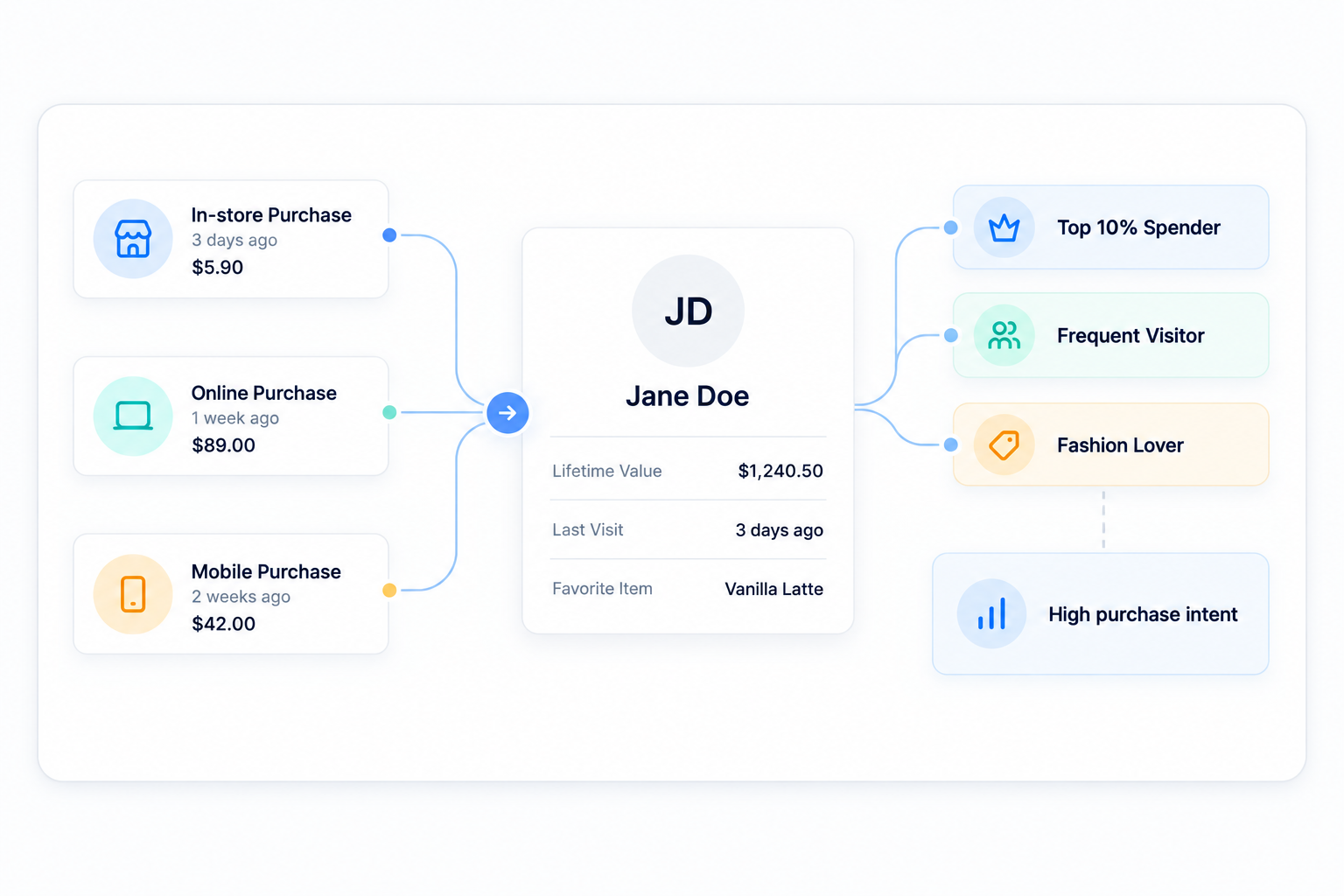
How does customer data get into the CRM?
Data is captured automatically when a customer uses a credit card at the POS, makes an online purchase, joins your loyalty program, or books a reservation.
Can I export my CRM data?
Yes, you own your data. You can export customer lists and segments at any time for use in other platforms if needed.
Does the CRM track cash purchases?
If the customer is attached to the ticket at the POS (e.g., via a phone number lookup for loyalty), their cash purchase will be logged to their profile.
Is this module included with SalesVu, or do I need a separate plan?
It is part of the SalesVu platform. Your account team can confirm what is bundled in your specific plan and whether any optional modules apply to your setup.
Does it require new hardware?
Generally no — it runs on the same iPads, terminals, kiosks, scanners and printers most SalesVu accounts already use. Your account team can confirm peripheral compatibility for your setup.
How long does it take to get started?
Most operators are live during their onboarding plan. Multi-location and multi-concept rollouts run on a per-site schedule with your account team.
Does it work across multiple locations?
Yes. SalesVu is built multi-location, with per-location configuration and a rolled-up corporate view for owners and regional leads.
Where does this module get its data?
From the SalesVu data layer — POS, eCommerce, Inventory, CRM and loyalty — so every module reads from the same operational source of truth.
Will anything send or change without my approval?
By default, drafts and recommendations require a human approval step. You can later opt in to auto-actions for specific recurring workflows once you trust the outputs.
Does this work for restaurants and retail or just one?
Both. SalesVu is one platform across retail, restaurants, salons, studios, venues and grocery, so the same module fits whether the SKU is a t-shirt, an entrée, a service or a class.
Is the CRM separate from the POS customer record?
No. One customer record spans POS visits, eCommerce orders, loyalty, memberships, bookings and marketing. There is no separate CRM database to keep in sync.
Can I segment customers by visit or by location?
Yes. Segments can be built on any combination of spend, recency, frequency, tier, location, product category and event.
Does the AI Workforce act on the CRM?
Yes. The Churn Prediction Agent, Email & SMS Automation Agent and Personal Rewards Agent all read and write against the CRM.
How is consent handled for marketing?
Per-channel consent (email, SMS) is tracked on the customer record and enforced by the marketing module before anything sends.
What does the Customer Satisfaction feature do?
After a purchase or visit, customers are prompted to rate their experience and the response is attached to their CRM record, the staff member, and the location. Owners see CSAT trends by employee and store without buying a separate review tool.
What does Customer Groups do?
You can create named groups (Wholesale, VIPs, House Accounts, Members) and apply special pricing, discounts or invoicing rules to everyone in the group. That lets you serve B2B and retail customers from one POS without confusing the cashier.
What does Custom Fields on the Customer Profile do?
Capture any attribute you need (allergies, pet name, dress size, child birthdays, account number) on the customer record. Marketing and POS can then use those fields for segmentation and personalized service that competitors can't replicate.
What does Merge Duplicate Customers do?
Spot and combine duplicate records (same phone, same email, slightly different name) so loyalty points, visit history and lifetime value live on one profile. Without this, regulars look like new customers and your churn metrics lie.
What does Customer Comments and Notes do?
Staff can leave private notes on a customer ('always orders oat milk', 'in a wheelchair', 'service complaint from 4/12') visible on the POS the next time they walk in. It turns institutional memory into a system instead of leaving it in one server's head.
What does External ID on the Customer record do?
Stamp each customer with an external ID from your accounting, membership or ticketing system. That keeps your CRM, your books, and your other systems in lockstep without manual reconciliation.
What does Save Customer Credit Card on File do?
Securely vault a customer's card on their CRM profile so future tabs, recurring memberships and house accounts charge with one tap. It powers tab-without-card-holding for trusted regulars and recurring revenue without re-asking for cards.
What does the Customer Purchase Report do?
Drill into any customer's full purchase history with totals, average ticket, category mix and trends. Owners and salespeople walk into every interaction knowing exactly who they're talking to.
What does Link Waiver Form PDF in Customer Profile do?
Attach signed waivers, releases or contracts directly to the customer's CRM record. Studios, activity centers and salons keep liability paperwork searchable for years without a filing cabinet.
What does Add a Customer Image do?
Upload a photo to the profile so staff recognize a regular when they walk in, even on shift one. Service feels personal even when the person serving has never met them before.
What does Customer Group Email Templates do?
Build a branded email template once, then send it to a saved customer group with one click. Marketing campaigns ship in minutes instead of needing a separate tool plus a designer.
What does Export and Import the Customer Database do?
Bring customers in from a previous system or hand-off file, and export your list back out at any time. You own and can move your customer data — there is no vendor lock-in on your most valuable asset.
What does the Tessitura Integration on CRM do?
For arts and culture venues, member status and customer records flow between Tessitura and SalesVu so the POS recognizes members and applies the right pricing automatically. Membership ROI is finally visible alongside retail and concessions revenue.